
What Is Content Automation? Understanding the Fundamentals
If your team feels buried in copy-paste work, you are not imagining it. Asana's Anatomy of Work report found that knowledge workers spend about 58% of their time on coordination and admin tasks instead of skilled work. That is a lot of status pings, approvals, and formatting that steal focus from real content. Source: Asana.
This is where content automation earns its keep. In 2026, it means using AI-powered and rules-based software to streamline the entire content lifecycle: planning, research, drafting, editing, publishing, distribution, and performance tracking. Put simply, content marketing automation handles the repetitive steps so humans can focus on ideas, accuracy, and brand voice. You still set the strategy. Automation handles the busywork.

You will see phrases like automated content creation, content workflow automation, and digital content automation used alongside it. They all point to the same goal. Move routine production and coordination into systems that never get tired, then reserve your attention for the judgment calls a machine cannot make.
Defining Content Automation in 2026
Content automation is the practice of connecting the tools you already use with AI-powered content tools and workflow rules. It reduces manual effort across each step of the content lifecycle. Think of it as a set of systems that: pull research automatically, generate first drafts where appropriate, run checks for SEO and readability, schedule posts, push content to channels, and feed results back into planning.
It is not a replacement for human creativity. It is a partner. You bring experience, context, and taste. Automation brings speed, consistency, and scale. The best teams blend both. They rely on AI for structured tasks and use editors to refine nuance, claims, and tone.
The Evolution from Manual to Automated Content Workflows
A decade ago, automation often meant simple schedulers and RSS-to-social tools. Platforms like Buffer and Hootsuite helped teams queue posts, and that was a big step forward. Then came connectors like Zapier and Make that chained apps together with triggers and actions. Today, large language models and modern AI writing assistants draft text, summarize sources, and suggest headlines. Quality control tools check for grammar, tone, and on-page SEO in seconds.
The result is a shift from one-off helpers to integrated systems. Content teams now orchestrate research, drafting, approvals, publishing, and analytics from a single workflow. That is content workflow automation in practice.
How Content Automation Actually Works
People ask, what is content automation, really? It is technology that connects your apps and automates end-to-end content processes using triggers and actions. A new brief in your project tool can trigger a keyword lookup. A draft status can trigger an SEO check and a human review request. A publish event can trigger distribution to newsletters and social. Analytics that fall below a threshold can trigger a refresh task. These chains run on reliable rules. Your team steps in where judgment is required.
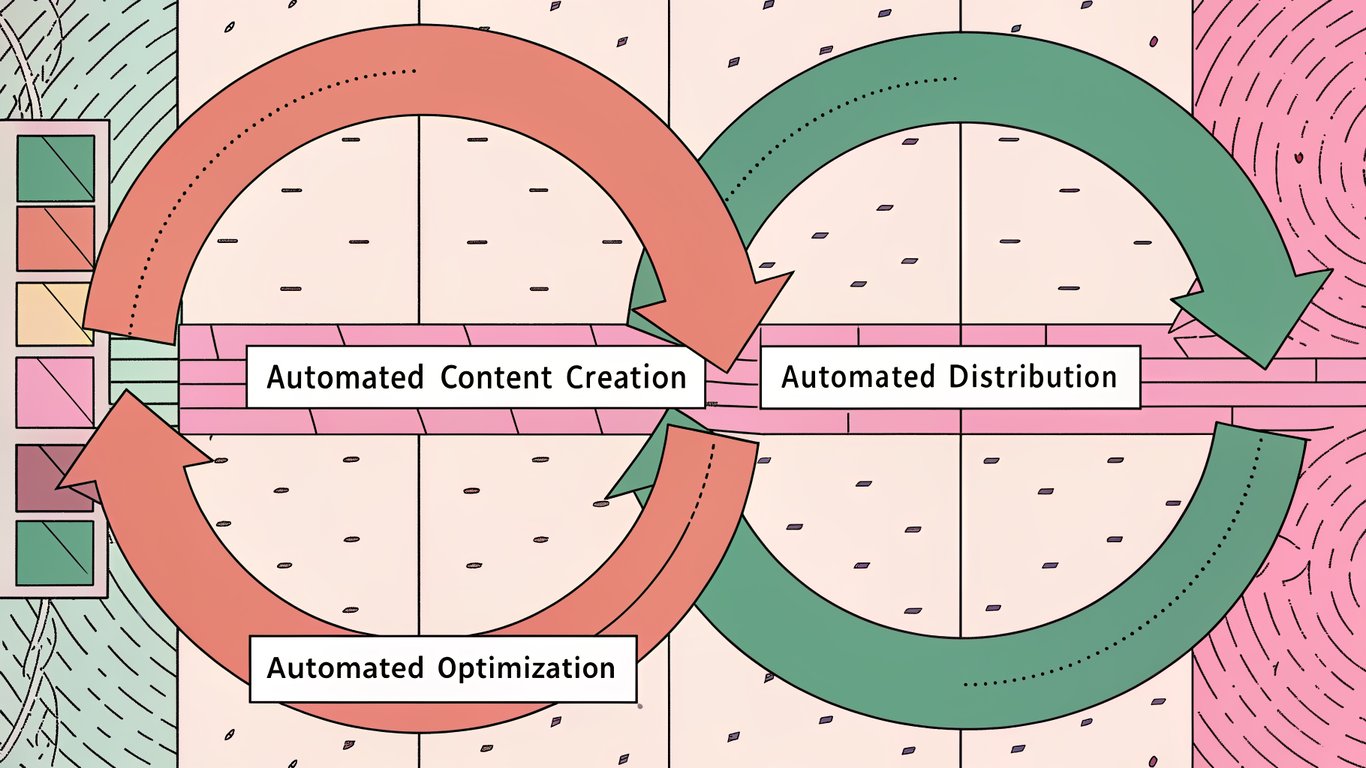
At a high level, there are three core components that work together:
1) Automated content creation: AI-assisted ideation, outlines, and first drafts for blog posts, social updates, and emails. Humans still fact-check, add original insights, and shape voice. 2) Automated distribution: scheduled publishing across your CMS and social platforms, plus coordinated email sends. Formats get standardized and posts go live on time. 3) Automated optimization: SEO checks, internal consistency scans, readability improvements, and performance tracking that loops data back into planning.
- Increased efficiency: Cut repetitive handoffs and manual formatting so your team ships more in the same time window.
- Cost savings: Reduce spend on low-value tasks like copy-paste and bulk scheduling. Invest those hours in research and subject matter expertise instead.
- Scalability: Go from a few posts a month to many across channels without losing control. Workflows scale better than headcount alone.
- Consistency: Enforce templates, brand voice checks, metadata standards, and publication timing automatically.
- Reduced human error: Fewer missed links, typos, broken images, and wrong publish dates thanks to automated checks.
- Data-driven insights: Pull analytics into dashboards automatically so you can see what works and adjust fast.
If you are new to this, start small. Pick one workflow that burns hours every week. Maybe it is turning briefs into outlines with AI-powered content tools. Maybe it is routing approved drafts into your CMS for scheduled publishing. Over time you will layer in more digital content automation and tie it all together.
What is next in this guide: we will map the full lifecycle from strategy to analytics, show where automated content creation fits, compare manual vs automated approaches, and highlight real tools for content distribution and optimization. You will also see practical ways to refresh old posts at scale and improve internal linking without spending your whole afternoon wrangling spreadsheets.
Content automation works best as a repeatable system. You design a clear content creation workflow, plug in the right automations, then keep improving it with data. It is not set-and-forget. It is a loop that moves from planning to research, creation, editing, publishing, and performance analysis, then back to planning again. That feedback cycle is what separates average teams from the ones that scale without losing quality.
The Content Automation Lifecycle: From Creation to Analysis
Stage 1: Strategy and Planning Automation
Goal: Build a data-backed plan fast, then keep it current. Automation helps you spot demand, cluster keywords, and map a calendar without spending days in spreadsheets. Many teams start with keyword research platforms like Semrush or Ahrefs. These tools surface search volume, difficulty, related queries, and competitor pages. For search intent, you can scan SERP features and top results to see whether a term is informational, commercial, or transactional. Some marketers speed up ideation with Google Trends, AnswerThePublic, and AlsoAsked to pull the questions people actually ask. For topic clustering, dedicated tools like Keyword Insights group keywords by intent and SERP similarity. That gives you a blueprint for pillar pages and supporting posts. Once you have clusters, a workflow automation platform such as Zapier, Make, or Activepieces can push tasks into your project tool, tag due dates, and populate your content calendar automatically. You cut manual copy-paste, and you keep the plan in sync as things change.
Stage 2: Content Research and Ideation
Goal: Turn raw data into angles your audience will care about. AI tools pull in trends and audience signals so you do not start from a blank page. For trend scanning, tools like BuzzSumo and Exploding Topics help you see what is gaining attention. You can layer that with audience research from SparkToro to learn which sources, subreddits, and podcasts your buyers already follow. Then use AI to generate data-backed outlines and idea lists. Many teams use ChatGPT, Jasper, or Writer to suggest angles tied to search intent, pain points, and seasonality. The best setups pull metrics into the brief automatically. You include target keywords, competing URLs, and questions to answer. That way the writer or AI model knows exactly what to cover and why.
Stage 3: Automated Content Generation
Goal: Produce on-brand drafts at speed, then reserve human time for subject matter expertise. AI can draft blog posts, social captions, and email copy. It can also localize meta descriptions and variations for A/B tests. In practice, teams often generate a long-form first draft with a tool like ChatGPT or Jasper, then spin out platform-specific snippets in the same session. For WordPress workflows, RepublishAI is a focused option that analyzes top Google results and writes comprehensive SEO articles for WordPress through its Atlas agent. That WordPress-specific automation trims handoffs inside the CMS. You still need human reviewers for unique insights and first-hand experience, but the heavy lifting of drafting no longer blocks your schedule.
Stage 4: Editing, Optimization, and Quality Control
Goal: Ship content that is accurate, readable, and optimized. This is where content optimization tools and QA checks shine. Grammar and clarity sweeps can run through Grammarly or LanguageTool. Readability checks often happen in Hemingway Editor. For on-page SEO, tools like Surfer SEO and Clearscope suggest terms to cover, heading structure tips, and content gaps. Inside WordPress, plugins such as Yoast SEO and Rank Math flag missing meta tags, internal links, and schema basics before you hit publish. And most teams set up pre-publish checklists that run automatically. They confirm links work, images have alt text, slugs are clean, and canonical tags are set. Human review is still mandatory. It protects brand voice, adds first-hand expertise, and catches nuance AI tends to miss.
Stage 5: Publishing and Distribution Automation
Goal: Get content live and in front of the right people without manual copy-paste. In WordPress, you can queue posts for scheduled times and auto-apply templates for categories and tags. For automated publishing to social, tools like Buffer and Hootsuite handle timing, variations per network, and bulk uploads. Email platforms such as Mailchimp and ActiveCampaign can trigger newsletters from new posts using RSS or a direct integration. A workflow automation platform like Zapier or Make can also push new content to Slack, create promo tasks, and add links to your internal knowledge base. For cleaner content distribution automation, standardize UTM parameters with a generator like Google’s GA4 Campaign URL Builder. That one habit saves you headaches later in analytics.
Stage 6: Performance Tracking and Analytics
Goal: Measure results, spot patterns, and feed insights back into planning. This is the engine behind real scale. At a minimum, connect Google Analytics 4 and Google Search Console for content performance tracking. GA4 shows engagement, assisted conversions, and paths. Search Console reveals queries, impressions, average position, and click-through rates. You can centralize reports in Looker Studio and set alerts for traffic dips, ranking drops, or sudden wins. Social dashboards from Buffer or Hootsuite add post-level reach and engagement. The final step is the loop. Use those insights to update your topic clusters, de-prioritize low ROI formats, and send refresh tasks back to Stage 1 automatically. A simple automation can create a ticket whenever a post’s traffic falls below a rolling average for a few weeks. It seems small. It keeps decay from spiraling.
| Stage | Manual Approach | Automated Approach | Time Saved |
|---|---|---|---|
| Strategy & Planning | Export keywords, group in spreadsheets, hand-build calendar, copy tasks to PM tool | Keyword clustering, calendar sync, PM task creation via Zapier/Make, auto-updated briefs | High |
| Research & Ideation | Manually scan SERPs, social feeds, and forums to find topics; write briefs from scratch | Trend scans with BuzzSumo, audience insights via SparkToro, AI-generated briefs | High |
| Content Generation | Write every draft from a blank page; handcraft social and email variants | AI-generated long-form drafts and channel-specific snippets using ChatGPT/Jasper and WordPress-focused tools like RepublishAI | High |
| Editing & Optimization | Manual proofreading, ad hoc SEO checks, inconsistent QA | Automated checks with Grammarly, Surfer, and pre-publish rules in Yoast | Moderate |
| Publishing & Distribution | Copy-paste to CMS and every channel; schedule by hand; inconsistent UTMs | Scheduled WordPress posts, social queues with Buffer/Hootsuite, RSS-to-email, standardized UTMs | High |
| Performance & Analytics | Pull reports monthly, compare by eye, slow feedback to planning | Always-on dashboards in Looker Studio, GA4/Search Console alerts, automatic refresh tickets | Moderate |
If you are on WordPress, a focused automation layer helps even more. A dedicated WordPress automation plugin for SEO and publishing can reduce friction between draft and publish, then tighten the loop between analysis and updates. You can explore one such option here: AI WordPress SEO and autoblogging plugin.
Think of the lifecycle as a wheel, not a line. Strategy informs research. Research guides generation. Editing polishes and protects quality. Publishing gets reach. Analytics sends proof back to strategy. The faster you spin that wheel, the more you can produce without overwhelming your team. And the better your workflows become over time.
Essential Content Automation Tools and Platforms
You do not need a giant stack to automate content. You need the right mix. Organize tools by job to be done, connect only what you will use weekly, and build around clear workflows. That is how teams actually get leverage from marketing automation tools without drowning in logins and half-baked zaps.
Below I break down the essential categories, the standout tools in each, and how they fit into a modern content workflow. I have stuck to real use cases and battle-tested platforms. If a tool is better for social queues than long-form AI content generation, I say that. If something is WordPress-first, I call it out. Use this as your shopping list and your roadmap.
AI-Powered Content Generation Tools
AI content generation is the spark plug. It helps with ideation, outlines, blog drafts, social copy, ad variations, and even light repurposing. The goal is not to publish raw machine output. The goal is to speed up the parts that used to take hours, then layer human judgment on top. When you get this right, automated blog writing becomes reliable and still feels on-brand.
Tools I see teams rely on most often:
ChatGPT by OpenAI: best for fast ideation, outlines, structured drafting, and quick rewrites. Strong for brainstorming angles and building first-pass drafts across formats. Try it for turning transcripts into rough blog posts or turning a brief into 10 social snippets. Site: openai.com/chatgpt.
Jasper: positioned for marketing teams that want templates and collaboration. Good for product descriptions, ad copy, emails, and repeatable blog structures. The prebuilt workflows help new users move faster. Site: jasper.ai.
Writer (formerly Writer.com): known for enterprise-friendly controls. Many teams use it to keep tone consistent and to enforce terminology. Useful when you have compliance or strict brand voice requirements. Site: writer.com.
Copy.ai: lightweight way to generate social captions, product copy, and quick web copy variations. It is usually favored for speed and convenience. Site: copy.ai.
Claude by Anthropic: often praised for helpful, readable long-form output and careful reasoning. Many editors like it for summarization and draft refinement. Site: anthropic.com/claude.
- Multi-format outputs: blogs, social copy, email intros, product copy
- Promptable templates for repeatable structures
- Tone and style controls to keep voice consistent
- Assistance with outlines, FAQs, and meta descriptions for SEO automation
Tips that usually pay off: create a source-of-truth brief before you generate, paste in your style guide as context, and keep a vetted prompt library for recurring tasks. You get better content and less cleanup.
WordPress Automation Solutions
If WordPress is home base, dedicate part of your stack to content management automation on the site itself. This is where you can win back entire days. I am talking about internal linking at scale, automated updates to older posts, smarter editorial calendars, auto-generated images, and dependable publishing flows.
RepublishAI is a WordPress-first SEO and autoblogging plugin built for this exact gap. It uses specialized AI agents so you can automate different parts of the WordPress content lifecycle without duct-taping ten tools together. Atlas analyzes top Google results and writes comprehensive articles for you. Nova identifies outdated WordPress posts and refreshes them with current data to protect rankings. Nexus automates internal linking across posts so your site structure stays healthy as you scale. Vision generates and inserts relevant images so you do not stall on visuals. Learn more: RepublishAI.
PublishPress: editorial calendar, user roles, content status, and notifications. Great for teams that want clear stages from draft to published and fewer Slack pings. Site: publishpress.com.
Uncanny Automator: a no-code automation bridge inside WordPress. It connects plugins and apps, so you can trigger actions when a post is published or when a form is submitted. Think of it as Zapier for your WordPress ecosystem. Site: automatorplugin.com.
Jetpack: a suite from Automattic with performance, security, backups, and social sharing features. Many teams use Jetpack Social to auto-share new posts and keep distribution consistent. Site: jetpack.com.
- Automated internal linking and image insertion at publish time
- Editorial calendars with content statuses and role-based approvals
- Triggers and actions between plugins for hands-off workflows
- Basic social distribution right from WordPress plus scheduled queues
Quick sanity check before you add plugins: confirm they are maintained, test on a staging site, and watch performance. A few smart WordPress-specific automations beat a bloated stack every time.
SEO and Optimization Automation
Search is still the backbone for many content programs. The right SEO automation takes care of repetitive checks and keeps you working on the parts humans do best. You want stronger briefs, faster keyword clustering, better on-page suggestions, and constant site health monitoring.
Semrush: deep toolset for keyword research, competitive analysis, site audits, and position tracking. The content templates and topic research features are handy when you need data-backed outlines. Site: semrush.com.
Ahrefs: strong backlinks index and site explorer. Useful for content gap analysis, internal link opportunities, and monitoring rankings. I often see teams use Ahrefs for topic ideation and quick SERP checks. Site: ahrefs.com.
Surfer SEO: on-page optimization with content editor suggestions pulled from current SERPs. Good for optimizing an existing draft to match competitive intent and coverage. Site: surferseo.com.
Screaming Frog SEO Spider: desktop crawler that surfaces technical issues and metadata gaps. Great for content teams that want to spot thin pages, redirects, or duplicate titles in bulk. Site: screamingfrog.co.uk.
- Automated site audits and alerts for critical SEO issues
- Keyword clustering and content gap analysis at scale
- On-page recommendations aligned with real SERP data
- Rank tracking and cannibalization checks to protect gains
One thing to keep in mind. Tools can recommend dozens of optimizations. Prioritize changes that affect search intent alignment and internal linking before you obsess over minor keyword density tweaks. That is the lever that usually moves rankings faster.
Social Media Scheduling and Distribution
You need content scheduling software that makes distribution dependable. Most social wins come from consistency and smart repackaging of the content you already have. Queue it, set approval flows, and keep the evergreen slots full.
Buffer: clean interface, easy queues, and a focus on scheduling plus basic analytics. Good for small to mid-sized teams that value simplicity and reliable posting. Site: buffer.com.
Hootsuite: broader enterprise features with team permissions, engagement monitoring, and integrations. Useful when multiple people post across many profiles and regions. Site: hootsuite.com.
Later: strong for Instagram, TikTok, and visual planning. The calendar view helps you map campaigns and align with seasonal content. Site: later.com.
Sprout Social: publishing plus listening and reporting. Often chosen by teams that want a unified view across social performance and customer interactions. Site: sproutsocial.com.
- Bulk scheduling and evergreen queues so backlogs actually publish
- Approval workflows and role permissions to prevent off-brand posts
- UTM parameter templates for clean analytics attribution
- Content recycling rules that keep top posts active without spamming
You will probably get more reach by aligning social posts with search-led content. For example, schedule a Twitter thread and LinkedIn post the same week a new long-form article goes live. Then resurface it a month later with a different hook.
Email Marketing Automation
Email still converts. Modern platforms function like full marketing automation tools with visual journeys, behavioral triggers, and tight CRM links. What matters most is segmentation and timely follow-ups, not just pretty templates.
ActiveCampaign: powerful automations with a visual builder, site tracking, and CRM features. Good fit when you want behavior-based sequences and lead scoring. Site: activecampaign.com.
Mailchimp: approachable toolkit for lists, campaigns, landing pages, and basic automation. Many small businesses start here and stay if their needs are simple. Site: mailchimp.com.
HubSpot Marketing Hub: email plus CRM plus automation in one place. Helpful for aligning content with the sales pipeline and tracking lifecycle stages. Site: hubspot.com.
ConvertKit: popular with creators and publishers for simple sequences and tagging. Solid for newsletter-first businesses that sell digital products. Site: convertkit.com.
- Visual journey builders with triggers from clicks, page views, or purchases
- Segment-level personalization and dynamic blocks in emails
- A/B testing for subject lines and send-time optimization
- Integrations with CMS, forms, and checkout for clean handoffs
If you run content on WordPress, connect your email platform to new-post webhooks. Then route highlights into a weekly digest and a separate evergreen series. That keeps new readers warm without manual curation every Friday.
Analytics and Reporting Tools
Automation without measurement is just noise. You want clear answers to simple questions: what topics drive engaged sessions, which posts contribute to assisted conversions, and which channels deserve more budget. The right stack will show trends early so you can adjust content and distribution before performance dips.
Google Analytics: event-based analytics and customizable reports that help quantify content impact. Use content groupings and conversion paths to track how articles contribute to revenue. Site: marketingplatform.google.com.
Google Search Console: essential for impressions, clicks, queries, and indexing. It is your source for search performance and technical coverage insights. Site: search.google.com/search-console.
Parse.ly: content analytics with audience and engagement focus. Editors often use it to understand which stories keep readers returning and which sources drive loyal visits. Site: parse.ly.
Chartbeat: real-time editorial analytics that surface what is resonating now. Handy for newsrooms and high-volume blogs. Site: chartbeat.com.
- Unified dashboards for traffic, engagement, and conversions
- Attribution that maps content to pipeline metrics
- SEO automation alerts from GSC data and site crawls
- Segment analysis to spot compounding wins and content decay
If your reporting still happens in spreadsheets, consider templated Looker Studio dashboards that refresh daily. Pipe in GA, GSC, and social data. Then meet weekly to decide what gets promoted, refreshed, or retired.
Top automation tools at a glance
People also ask: what are the top 5 automation tools today? Here is a practical comparison across categories. I did not list exact prices since plans change frequently. Instead I note whether a free plan exists or if pricing varies by tier.
| Tool | Best For | Key Features | Starting Price |
|---|---|---|---|
| ChatGPT | AI content generation and structured drafting | Outlines, draft expansion, summarization, format conversions | Free plan available; paid plans available |
| RepublishAI | WordPress SEO automation and autoblogging | Atlas long-form articles; Nova content updates; Nexus internal linking; Vision images | Paid plans available |
| Semrush | SEO research, audits, and on-page optimization guidance | Keyword research, site audits, topic research, rank tracking | Paid plans available |
| Buffer | Social media scheduling and basic analytics | Queues, calendar, team approvals, UTM templates | Free plan available; paid plans available |
| ActiveCampaign | Email automation and CRM-driven journeys | Visual automations, site tracking, segmentation, A/B testing | Paid plans available |
| Google Search Console | Search performance tracking and indexing insights | Query data, coverage reports, URL inspection, alerts | Free |
If you need a bare-minimum starter kit, you can pair ChatGPT for AI content generation, Semrush for SEO automation, Buffer for distribution, and Google Search Console for performance. Add a WordPress-first layer when your library grows and you need internal linking, content refreshes, and image automation handled reliably.
How to choose the right stack by function
Choosing tools by function beats chasing features. Map every tool to one stage in your workflow, then confirm two things. First, it eliminates a repetitive task. Second, it integrates cleanly with your CMS and analytics. If the answer is not a strong yes for both, keep looking.
- For strategy and briefs: use Semrush or Ahrefs to generate clusters and identify intent. Save report templates so you are not rebuilding them every month.
- For first drafts and repurposing: run ChatGPT or Jasper to build structured drafts. Keep a prompt library and a style guide snippet you paste into every session.
- For WordPress publishing: use a site-native plugin to automate internal links, images, and updates. A focused WordPress layer keeps the last mile smooth.
- For social queues: pick Buffer or Later if you want clean scheduling, or Hootsuite or Sprout Social if you need team workflows and listening.
- For email: ActiveCampaign or HubSpot if you need journeys and CRM data, Mailchimp if you want simple campaigns fast.
- For measurement: Google Analytics and Google Search Console are non-negotiable. Add Parse.ly or Chartbeat if editorial decisions drive your calendar.
Practical WordPress use cases that save hours each month
Here is where content management automation usually pays off fastest on WordPress. It is less glamorous than a shiny AI demo, but it is the difference between publishing consistently and getting stuck in the review queue.
- Internal linking at scale: set topic rules or entities and let an automation layer suggest or insert links that strengthen topical clusters. It keeps older posts alive and helps search engines understand structure.
- Automated content updates: surface declining posts and refresh facts, screenshots, and examples in one pass. Protects rankings and credibility.
- Image generation and insertion: generate lightweight, on-brand images and insert them automatically into new posts. No more holding drafts for design.
- Editorial calendars with guardrails: status-based approvals, role-specific notifications, and checklists so drafts do not skip critical steps.
If you want a WordPress-first approach that handles these jobs under one roof, explore WordPress SEO automation options that are purpose-built for site owners rather than general AI apps. It is often simpler and cheaper than stitching together five different tools.
Category checklists: what to look for before you buy
- AI generation: look for system prompts, reusable templates, tone controls, and safe handling of brand voice. Bonus if you can upload guidelines or glossaries.
- WordPress automation: confirm compatibility with your theme and major plugins, support for custom post types, and simple rollback if an automation goes wrong.
- SEO platforms: demand crawl scheduling, easy exports, and a way to track pages as a group so you can evaluate content clusters, not just URLs.
- Social scheduling: test the calendar UX, bulk uploads, approval flows, and UTM templates. You want to build posts in 1 or 2 clicks, not 12.
- Email automation: try the visual builder, conditions, and segment logic. You should be able to build a 3-branch journey without reading a manual.
- Analytics: insist on clean attribution and filters. If a tool cannot show you content outcomes by topic or funnel stage, it will not help with decisions.
Real-world tool pairing examples that work well together
Sometimes it is the pairing that matters. A few combinations consistently reduce friction and improve quality.
- ChatGPT plus Surfer SEO: generate a draft with sections mapped to intent, then refine headings and coverage with Surfer. You get speed and SERP alignment.
- Jasper plus Buffer: build 10 short social variants from one blog and schedule them as a drip over 30 days. It keeps the post alive past launch week.
- ActiveCampaign plus WordPress: trigger an onboarding sequence when a subscriber reads 3 related posts. It turns passive readers into leads.
- Semrush plus Google Search Console: plan topics with Semrush data and watch real query shifts in GSC. Adjust titles and intros based on early signals.
- WordPress automation layer plus Google Analytics: automate internal linking and updates, then measure whether engaged sessions and assisted conversions rise for those clusters.
Common pitfalls when evaluating content automation platforms
- Feature chasing over workflow fit: a slick feature does not help if it does not eliminate a step in your actual process.
- Ignoring governance: without approvals and role permissions, automation creates risk. Make governance part of the selection.
- Underestimating maintenance: integrations break, APIs change. Choose vendors with clear changelogs and responsive support.
- No measurement plan: if you do not define success before rollout, you will not know what is working. Set baseline metrics first.
FAQ: Are general AI tools enough, or do you need WordPress-specific automation too?
General tools are great for drafts and ideas. They are less helpful on the last mile. That is where content scheduling, internal links, structured updates, and images all have to land cleanly in your CMS. If WordPress runs your site, a WordPress-focused layer usually pays for itself. It handles publishing details that general AI apps do not, and it keeps your library tidy as you scale.
Putting it together: a sample stack by maturity level
- Starter: ChatGPT, Buffer, Google Analytics, Google Search Console. Manual uploads to WordPress. Light tag hygiene in GA. Simple, low-cost, functional.
- Growing team: ChatGPT or Jasper, Semrush, Buffer or Later, ActiveCampaign or Mailchimp, a WordPress automation plugin for internal linking and updates, GA plus a Looker Studio dashboard. Content cadence becomes predictable.
- Scale: Dedicated WordPress automation for internal links, updates, and images, Surfer SEO for on-page optimization, Hootsuite or Sprout for complex teams, HubSpot for CRM-driven content, Parse.ly or Chartbeat for editorial decisions. Now you tune ROI and defend rankings.
Final notes on integration and maintenance
Integrations are the quiet hero. Before rollout, score tools on three things: native integrations with your CMS and email platform, API access in case you outgrow the UI, and the ability to export data. That keeps you mobile if plans change. Also, run a quarterly audit of your automations. Turn off rules that no longer serve you and double down on the flows that move the needle.
If you want deeper reading on WordPress-first approaches, check the resources at RepublishAI. Focus especially on how automated content updates and internal linking at scale can protect rankings while you publish new work. It is a quiet compounding advantage.
Advanced Content Automation Strategies for Maximum ROI
If you already batch content, schedule posts, and run basic SEO automation, the next wins come from systems that quietly keep your library fresh, connected, and personalized. The goal is simple. Use automation to protect rankings, compound traffic, and squeeze more value from every asset. That is real ROI.
Automating Content Updates and Refreshes
Content decay is predictable. Rankings slide, click-through rates dip, and once-sturdy evergreen posts turn out-of-date. Automated content updates catch this early. A smart workflow watches content performance tracking signals like position drops, shrinking impressions, and lower conversions. It then flags targets, suggests updates, and in some cases applies structured changes to keep pages competitive. On WordPress, teams often combine content optimization tools with a workflow automation platform that reads Search Console data, checks on-page elements, and refreshes metadata or internal links at scale. RepublishAI’s Nova agent focuses specifically on outdated WordPress posts and helps keep articles current without constant manual review.
Why it pays: recovering a slipping page often costs less than creating a new one. You protect existing backlinks, SERP history, and user behavior signals. Over a quarter, automated content updates stabilize traffic. Over a year, they compound.
- Define decay thresholds. Set rules like “drop of 3+ positions for 4 weeks” or “-20% clicks vs. 90-day average” to trigger a refresh task.
- Centralize signals. Pull data from Google Search Console and Google Analytics 4 into one queue. Include seasonality notes where relevant.
- Classify issues. Is the problem freshness, intent shift, thin sections, weak E-E-A-T signals, or missing entities? Tag each URL so the fix is obvious.
- Automate quick wins. Update titles, meta descriptions, FAQs, internal links, and out-of-date facts programmatically where safe.
- Route for human edits. Larger changes like new sections, expert quotes, or original screenshots should get editorial review.
- Reship and monitor. Republish with updated timestamps where appropriate, then track results for 2 to 4 weeks.
- Learn and refine. If a pattern works, codify it as a reusable automation rule for the next batch.
For a deeper walkthrough, see this content updates guide on our site: content updates guide.
Internal Linking Automation for SEO
Strategic internal links help search engines understand topic clusters, distribute authority, and crawl new pages faster. They also keep readers moving. The problem is scale. As your library grows past a few hundred URLs, manual linking falls behind. Automation analyzes site structure, anchor text patterns, and topical relevance. It then adds context-rich links to the right sections, not just footers or nav blocks. The ideal system identifies orphan pages, balances links to commercial and informational content, and honors no-link zones like legal templates or thin announcements. RepublishAI’s Nexus agent automates internal linking across WordPress sites, which saves a ton of time while keeping anchors natural and consistent.
Why it pays: stronger clusters, shorter crawl paths, and better user engagement. Internal linking is one of the highest ROI SEO moves because it is fully in your control and scales with your library. Pair it with SEO automation for titles, schema, and image alt text, and you get a measurable traffic lift.
Want practical frameworks for link structure and topical clusters? Check this internal linking strategies resource: internal linking strategies.
Multi-Site Content Management
Running several WordPress sites multiplies every small task. You need uniform categories, consistent author bios, recurring blocks, and synced internal link policies. Multi-site automation centralizes scheduling, bulk updates, and content standards across properties. Many teams use a single dashboard to push templates, apply shared taxonomies, and roll out security or SEO changes at once. RepublishAI’s AI WordPress Blog Editor is designed for managing multiple sites, which helps editorial teams keep pace without creating fragile one-off workflows.
Why it pays: fewer errors, faster launches, and better governance. One change to your pillar page template or author byline format should not take a week across five blogs. Get it done in minutes, then focus on higher-value work.
Personalization and Dynamic Content
Personalized content adapts to a reader’s behavior, location, or stage in the funnel. You might vary CTAs by referrer, swap case studies by industry, or adjust page modules based on returning vs. new user status. This is easier than it sounds if you split pages into components and power them with rules. Some teams connect their CRM segments to on-site experiences, then test which blocks move conversion. Others use geolocation to surface region-specific pricing disclaimers or delivery notes. Start small. A single personalized CTA can outperform a global one by a wide margin. Then scale the pieces that earn more ROI.
Bonus tip: integrate your personalization with content distribution automation. If an email click suggests interest in Topic A, route that user to a landing page variant keyed to Topic A. Keep the story consistent across channels.
Content Repurposing Automation
One strong article should fuel a dozen assets. Automation helps transform long-form posts into social threads, carousel captions, email summaries, and short video scripts. The flow is usually predictable. Pull key takeaways. Turn H2s into bite-size posts. Convert FAQs into a newsletter Q&A. Create a video outline. Then queue everything across channels using your scheduler. Some tools summarize and rephrase content so it fits platform tone without sounding robotic. You still approve final drafts, but the heavy lifting moves to the machine.
Why it pays: you tap new audiences without reinventing the wheel. Repurposing stretches your most expensive assets and lifts overall reach. Pair this with a calendar that re-promotes top performers quarterly. The long tail adds up.
If you want a simple framework to start, try this resource: WordPress content optimization tips.
Automated Content Auditing
Automated audits scan your library for broken links, outdated screenshots, duplicate H1s, missing alt text, thin sections, and schema issues. Many teams run crawls weekly, then pipe issues into a central backlog by severity. SEO site audit tools can flag robots.txt conflicts, redirect chains, and crawl budget sinks. For accessibility, automated checks catch common misses like low-contrast text or missing form labels. Compliance rules vary by industry, so build your own checklist and automate what you can. Human review still matters a lot, especially for medical, financial, or legal content.
Why it pays: technical debt is real. Small issues quietly erode performance and trust. An audit loop keeps your foundation solid while your team focuses on bigger wins.
See practical checklists and examples here: site-wide content audits.
How these strategies compound over time
Each tactic reinforces the others. Automated refreshes keep evergreen posts current, which makes internal links more valuable. Better linking improves crawl efficiency, which helps newly repurposed content get indexed faster. Personalization boosts conversion on the traffic you already have, which justifies more investment in updates and audits. Over six to twelve months, this creates a compounding loop. You publish less net-new content while driving more qualified traffic and conversions. That is durable ROI in a world where new content gets pricier every year.
Key takeaways to put into motion now
- Install a lightweight refresh pipeline first. It is the fastest path to visible wins.
- Automate internal links across your core clusters. Protect anchor text quality while scaling coverage.
- Add one high-impact personalization rule to a top landing page. Measure, then scale.
- Create a repurposing template for every new pillar post. Automate distribution to social and email.
- Schedule monthly audits for links, schema, and accessibility. Fix the top ten issues only, then repeat.
If you prefer a single place to start, this walkthrough is a solid baseline: content optimization and updates.
Implementing Content Automation: Best Practices and Common Pitfalls
You do not need a massive tech stack to get real value from content automation. You need a clear plan, a lightweight set of AI-powered content tools, and discipline around quality. I have rolled out automation at scrappy blogs and at large editorial teams. The same playbook works because it respects your content creation workflow and puts humans in charge.
Getting Started: Your Content Automation Roadmap
Start small. Prove value. Then scale. Here is a practical roadmap that keeps your content workflow automation clean and measurable.
- Audit current processes - Map your end-to-end content creation workflow from brief to publish to refresh. Time each step. Capture review loops and tools used. Establish a baseline.
- Identify repetitive tasks - Flag high-friction work like keyword clustering, drafting outlines, image sourcing, uploading to WordPress, metadata, and internal linking. These are prime for automated content creation and distribution.
- Choose tools that integrate - Prioritize marketing automation tools that plug into your CMS and analytics. For WordPress-first teams, a plugin that automates writing, SEO tasks, and internal links reduces glue work.
- Start with one workflow - Pick a narrow path such as Brief -> Outline -> First Draft or Draft -> On-page SEO -> Publish. Ship a working automation before touching anything else.
- Establish quality control checkpoints - Add gates for factual review, brand voice, E-E-A-T, links, and accessibility. Automation should surface issues. Humans approve.
- Train the team - Document prompts, templates, and review criteria. Run short workshops. Pair power users with editors so best practices spread.
- Measure results - Track time saved, cycle time, content output volume, cost per piece, and engagement. Compare to your baseline.
- Scale gradually - Extend to more content types, then to multi-site publishing. Revisit rules monthly so automations do not drift.
If you run WordPress, WordPress-specific automation shortens setup time and reduces breakpoints. A focused solution like RepublishAI can centralize AI content generation, SEO updates, and internal linking so your editors stay inside the CMS.
Maintaining Quality and Brand Voice
Automation should make quality easier to achieve, not harder. Protect your brand voice and accuracy with simple rules and clear ownership.
- Create a living style guide - Include voice, tone, reading level, banned phrases, preferred terminology, and formatting rules. Keep examples of great intros, CTAs, and headings.
- Codify review layers - Set a two-pass model: subject matter check for accuracy, then editorial check for clarity and voice. On small teams, the same person can do both in two passes.
- Use approval workflows - Require human sign-off before publishing automated drafts. Keep a visible checklist: sources cited, claims verified, links checked, images licensed, alt text added.
- Define quality gates - Add automated flags for readability target, missing meta, broken links, and duplicate H1s. Humans resolve the flags. Tools can scan, editors decide.
- Standardize prompts and templates - Reusable briefs and prompt patterns reduce variance across AI-powered content tools while preserving your editorial DNA.
- Track errors post-publish - Monitor corrections and update logs. If one issue repeats, adjust the template or add a new gate.
For analytics and QA visibility, many teams rely on Google Analytics for engagement reporting, Google Search Console for indexing and queries, and WordPress for editorial logs. Tie these together so quality issues surface quickly.
Measuring Success: Key Metrics to Track
Benchmarks are context dependent. That said, setting practical targets keeps everyone aligned. Aim for improvements you can actually attribute to content marketing automation, then iterate.
| Metric | What It Measures | Target Benchmark | Tools to Track It |
|---|---|---|---|
| Time saved per piece | Production efficiency across research, drafting, SEO, and publishing | Early goal: cut manual time by 20-30% within 60-90 days | Google Analytics events, internal time tracking, CMS timestamps |
| Content output volume | Throughput of approved, on-brand pieces | Increase monthly output by 25-50% without lowering quality | CMS reports, editorial calendar exports |
| Organic traffic growth | Search performance from automated content creation and updates | Sustained month-over-month growth after indexing stabilizes | Google Search Console, GA acquisition reports |
| Engagement rates | Reader interest and usefulness | Maintain or improve average time on page and CTR while scaling | GA engagement, scroll-depth events |
| Cost per piece | Total cost to ship one publish-ready asset | Reduce blended cost by 15-30% while retaining quality | Finance sheet plus CMS output, time logs |
| Publication lead time | Cycle time from brief to publish | Shorten cycle by 20-40% as automations mature | CMS timestamps, project tracker |
| Error rate after publish | Quality of automation plus review process | Trend toward near-zero factual or formatting corrections | Issue tracker, correction logs |
Common Mistakes to Avoid
- Over-automating - Pushing AI to make strategic or editorial decisions. Avoid by keeping humans in charge of briefs, angles, and final approval.
- Neglecting quality control - Shipping drafts without fact checks or link checks. Avoid by adding mandatory QA gates and a responsible owner.
- Ignoring brand voice - Letting templates drift into generic copy. Avoid by maintaining a style guide with examples and running periodic voice reviews.
- Not training the team - Hoping tools will teach themselves. Avoid with short playbooks, Loom walkthroughs, and office hours.
- Choosing incompatible tools - Forcing work through apps that do not talk to your CMS. Avoid by testing integrations with your actual stack before purchase.
- Failing to measure ROI - No baseline, no wins. Avoid by timing current tasks first and tracking the same metrics after rollout.
- Automating without strategy - Creating output with no link to goals. Avoid by tying workflows to KPIs like pipeline contribution or SEO growth.
- Not updating automation rules - Outdated prompts and keyword rules hurt quality. Avoid by reviewing rules monthly and after major search updates.
- Ignoring user feedback - Readers signal when content misses. Avoid by monitoring comments, on-site surveys, and search queries for intent shifts.
- Treating automation as set-and-forget - Systems decay without care. Avoid by assigning an owner to monitor errors, performance, and drift.
The Future of Content Automation
We are moving from single-use prompts to coordinated AI agents that handle multi-step tasks with checks and handoffs. Expect smarter predictive content optimization that suggests topics and refreshes based on seasonality and search shifts. Voice search optimization will continue to matter as assistants improve, which probably pushes more concise, question-first formatting. Video content automation is also getting practical with script generation, b-roll suggestions, and auto captions. The teams that win will blend agents with clear editorial rules and strong measurement.
If you are on WordPress, purpose-built tools will likely do more of the heavy lifting right inside your CMS. That reduces copy-paste errors and keeps your content marketing automation close to the editor where it belongs.
You do not need to overhaul everything. Pick one workflow, prove the lift, and build from there. If you want a WordPress-specific boost, explore RepublishAI or another WordPress automation plugin to streamline drafting, SEO tasks, and internal links without leaving the editor. You can also review options and next steps on the pricing and getting started information, then pilot with a single content type. If you prefer a quick overview, scan this short WordPress automation guide and map it to your team.