

Voice search isn't just changing how people find information online. It's completely rewriting the rules of content optimization. When someone types a query, they might search for "best pizza NYC." But when they speak? They're asking their phone, "What's the best pizza place near me that's open right now?" That difference matters more than you'd think.
WordPress sites are actually in a pretty good position for this shift. The platform's semantic HTML structure and extensive plugin ecosystem make it easier to implement the technical changes voice search demands. But you've got to know what you're doing.
The Evolution of Voice Search: 2026 Landscape and User Behavior
About 153.5 million people in the United States now use voice search regularly. That's not a small audience to ignore. And here's what's interesting: 38.8 million Americans specifically use voice search for shopping-related activities.
Voice queries are fundamentally different from typed searches. They're longer, more conversational, and usually phrased as complete questions. Someone typing might search "WordPress voice optimization." Someone speaking asks, "How do I optimize my WordPress site for voice search?" See the difference? One's a keyword fragment. The other's a natural question.

How Voice Assistants Extract Answers from WordPress Content
Google Assistant, Alexa, and Siri don't read your entire article when someone asks a question. They scan for specific signals: structured data markup, clear heading hierarchies, and concise answer blocks. WordPress's semantic HTML structure helps here because it naturally organizes content in ways these assistants can parse.
When a voice assistant finds your content, it's looking for a direct answer it can read aloud. That means your content needs to provide clear, extractable information in the first 40-60 words of a section. The rest can provide context and detail, but that initial answer block is what gets spoken.
The Featured Snippet-Voice Search Connection
Featured snippets and voice search results are closely connected. When Google selects content for position zero (that featured snippet box at the top of search results), it's often the same content voice assistants read aloud. Capturing a featured snippet dramatically increases your chances of being the voice search answer.
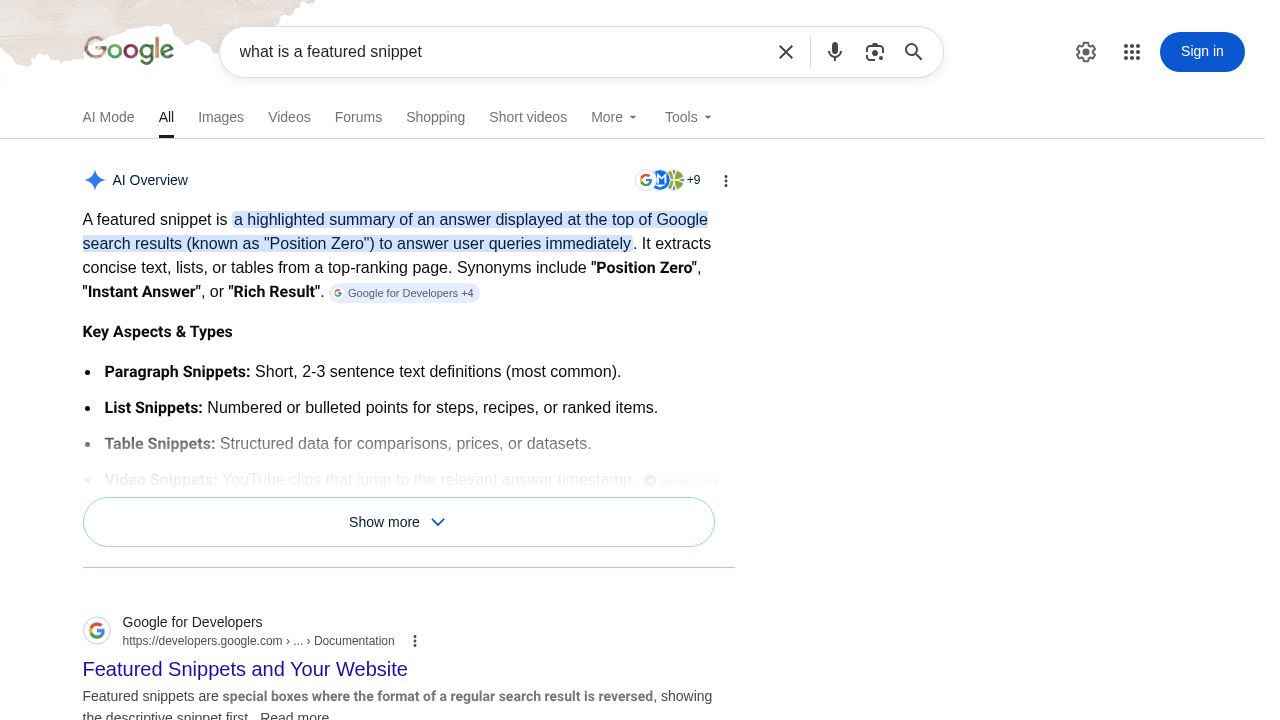
WordPress content can target these positions by structuring answers in specific formats: paragraph snippets (40-60 words), list snippets (numbered or bulleted), and table snippets (comparison data). Each format serves different query types.
WordPress-Specific Advantages for Voice Optimization
WordPress gives you some built-in advantages. The block editor makes it easy to create structured content with proper heading hierarchies. Plugins like Yoast SEO and Rank Math can add schema markup without touching code. And the platform's flexibility means you can implement advanced optimizations as your strategy evolves.
Content Structure Tactics: Formatting WordPress Posts for Voice Query Success
Structure matters more for voice search than traditional SEO. You're not just optimizing for keywords anymore. You're optimizing for how people actually speak and how voice assistants extract information.
Implementing Question-Based Heading Hierarchies
Your H2 and H3 tags should mirror the questions people actually ask. Instead of "Voice Search Optimization Techniques," use "How do I optimize for voice search?" This isn't just about matching queries. It's about creating content that voice assistants can easily identify as relevant to specific questions.
In the WordPress editor, this is straightforward. When you create a heading block, think about the question your section answers. Write that question as your heading. It feels weird at first, but it works.
The Inverted Pyramid Approach for Voice-First Content
Put your answer first. Then provide supporting details. This inverted pyramid structure works perfectly for voice search because assistants can grab that initial answer and read it aloud. The detailed explanation that follows serves readers who want more context.

For example, if someone asks "What is schema markup?" your first paragraph should directly answer that in 40-60 words. The next paragraphs can explain types of schema, implementation methods, and benefits. But that first answer block is what gets extracted.
Creating Scannable Answer Blocks in WordPress
WordPress blocks make this easy. Use paragraph blocks for definition-style answers. List blocks for step-by-step instructions or feature comparisons. Table blocks for data comparisons. Each format serves a different snippet type.
Keep those answer blocks concise. Voice assistants typically extract 40-60 words for spoken answers. If your answer runs longer, it's less likely to be selected. This doesn't mean your entire content should be short, just those initial answer segments.
Building Comprehensive FAQ Sections with WordPress
FAQ sections are perfect for voice search. They naturally match question-based queries. In WordPress, you can create these using the native blocks, dedicated FAQ plugins, or custom HTML with proper schema markup.
Each FAQ should follow the same pattern: clear question as heading, concise answer immediately following. You can expand with additional details, but that initial Q&A pair is what matters for voice extraction.
Technical WordPress Configuration for Voice Search Optimization
Technical optimization isn't optional for voice search. You need proper schema markup, fast page speeds, and mobile-friendly design. WordPress makes most of this manageable, but you've got to configure things correctly.
Implementing Schema Markup for Voice-Friendly Content
Schema markup tells search engines exactly what your content means. For voice search, FAQ schema and HowTo schema are particularly valuable. They structure your content in ways voice assistants can easily parse and extract.
Plugins like Yoast SEO, Rank Math, and Schema Pro can add this markup automatically. You select your content type, and the plugin generates the appropriate schema. For more control, you can add custom schema using JSON-LD in your theme's functions file or a custom plugin.

WordPress Performance Optimization for Voice Search
Page speed affects voice search rankings. Slow sites get deprioritized. For WordPress, this means implementing caching (plugins like WP Rocket or W3 Total Cache), optimizing images (try ShortPixel or Imagify), and using a content delivery network.
These optimizations aren't just for voice search. They improve overall user experience. But they're particularly important for voice because most voice searches happen on mobile devices with varying connection speeds.
Mobile-First WordPress Configuration
Most voice searches happen on mobile devices. Your WordPress theme needs to be fully responsive. Test your content blocks on mobile to ensure they're readable and properly formatted. Touch-friendly navigation matters because users often interact with search results after voice queries.
Essential WordPress Plugins for Voice Search Optimization
- Yoast SEO or Rank Math: Schema markup, content analysis, and readability scoring
- WP Rocket: Comprehensive caching and performance optimization
- ShortPixel: Automatic image compression and optimization
- Ultimate FAQ: Dedicated FAQ creation with schema support
- TablePress: Easy table creation for comparison snippets
Keyword Research and Content Planning for Conversational Queries
Voice search keywords are different. They're longer, more conversational, and usually phrased as questions. Your keyword research needs to account for this.
Identifying Voice Search Keywords vs. Traditional Keywords
Tools like AnswerThePublic show you the questions people ask about your topics. Google's "People Also Ask" boxes reveal related queries. Your own Google Search Console data shows which question-based queries already bring traffic to your site.
Look for patterns in how people phrase questions. "How to optimize for voice search" is a voice-friendly keyword. "Voice search optimization" is traditional. Both matter, but the question format is what you're targeting for voice.
Mapping User Intent to WordPress Content Types
Different queries need different content formats. Informational queries ("What is...") work well as blog posts with clear definitions. How-to queries need step-by-step guides. Comparison queries benefit from tables and structured comparisons.
WordPress's flexibility lets you create the right format for each query type. Use custom post types, page templates, or simply structure your standard posts appropriately.
Writing and Formatting Techniques for Voice-Optimized WordPress Content
How you write matters as much as what you write. Voice-optimized content sounds natural when read aloud. It uses conversational language while maintaining authority.
Adopting Conversational Writing Style in WordPress Posts
Write like you're explaining something to a colleague. Use contractions (don't, I'm, you'll). Address readers directly with "you." Ask rhetorical questions. This conversational tone matches how people speak their queries and makes your content more likely to be selected for voice answers.
Crafting Direct, Concise Answers for Featured Snippets
The formula is simple: question as heading, direct answer in 40-60 words immediately following. Then expand with details. This structure works for both featured snippets and voice extraction.
In WordPress, format these answer blocks clearly. Use paragraph blocks for the answer. Consider using a different background color or border to visually distinguish answer blocks from supporting content.
Using Lists, Tables, and Structured Data in WordPress Blocks
Different snippet types require different formats. Numbered lists work for step-by-step instructions. Bulleted lists work for feature comparisons or option lists. Tables work for data comparisons or specifications.
The WordPress block editor makes all of these easy to create. Use the list block for ordered or unordered lists. Use the table block for comparison data. Each format increases your chances of capturing different snippet types.
Advanced WordPress Tactics for Featured Snippet Dominance
Once you've got the basics down, advanced tactics can help you capture and maintain featured snippet positions.
Conducting Featured Snippet Gap Analysis with WordPress Content
Look at which queries in your niche already have featured snippets. Analyze their structure. What format are they using? How long is the answer? What's the content quality like? Then create better content that follows the same structural patterns but provides more value.
Tools like SEMrush and Ahrefs can show you which snippets your competitors own and which opportunities exist in your space.
Implementing Multi-Format Answer Strategies
Some queries can be answered in multiple formats. Provide a paragraph answer, a list version, and maybe a table comparison all in the same article. This increases your chances of capturing the snippet regardless of which format Google prefers.
Content Refresh Strategies to Maintain Featured Positions
Featured snippets aren't permanent. Competitors can take them. Google's preferences change. Regularly update your WordPress posts with current data, improved answers, and enhanced formatting. Set a schedule to review and refresh your top-performing content every few months.
Measurement, Testing, and Continuous Optimization
You can't improve what you don't measure. Tracking voice search performance requires specific metrics and tools.
Setting Up Voice Search Tracking in Google Analytics and Search Console
Google Search Console shows which queries bring traffic to your WordPress site. Look for question-based queries and longer, conversational phrases. These are probably voice searches. Track which pages rank for these queries and monitor their performance over time.
In Google Analytics, you can't directly identify voice searches, but you can track mobile traffic patterns and engagement metrics that suggest voice-driven visits.
Monitoring Featured Snippet Performance with SEO Tools
SEO tools like SEMrush, Ahrefs, and Rank Math can track which of your WordPress pages hold featured snippet positions. Monitor these regularly. When you lose a snippet, analyze what changed and adjust your content accordingly.
Creating a Voice Search Optimization Workflow in WordPress
Establish a repeatable process: research question-based keywords, create structured content with clear answer blocks, implement proper schema markup, publish and monitor performance, then refresh and optimize based on results. This workflow ensures consistent voice search optimization across all your WordPress content.
Voice search optimization isn't a one-time project. It's an ongoing strategy that requires consistent attention to content structure, technical implementation, and performance monitoring. But for WordPress sites, the platform's flexibility and extensive plugin ecosystem make it entirely manageable. Start with your highest-traffic pages, implement these tactics systematically, and you'll probably see improvements in both voice search visibility and traditional search rankings.