

You've probably got dozens (or hundreds) of blog posts sitting on your website right now. Some are performing well. Others have seen better days. And a few are basically collecting digital dust.
Here's the thing: you don't always need to create new content to improve your search traffic. Sometimes, the smartest move is updating what you already have.
What is Content Refresh? The Simple Definition
A content refresh is the practice of updating existing content rather than creating something entirely new. It includes replacing outdated information or sources, adding new insights on the topic, fixing broken links, and optimizing for current search trends.
Think of it like renovating a house instead of building from scratch. You're working with a solid foundation that's already there, just making it better, more current, and more valuable to the people who visit.

The beauty of what is content refresh comes down to efficiency. You're leveraging work you've already done, authority you've already built, and backlinks you've already earned. You're just making everything more relevant for today's audience.
Content Refresh vs. Creating New Content
Creating new content means starting from zero. You need to research topics, outline structure, write everything, add images, optimize for SEO, and then promote it. That's a lot of work for something that might not rank for months (or ever).
Refreshing existing content? You've already got most of the heavy lifting done. The structure exists. The backlinks are there. Search engines already know about the page. You're just updating and improving what's working.
New content is essential for covering fresh topics and expanding your reach. But refreshing can deliver exponential increases in traffic and leads with a fraction of the effort. Both have their place, but many marketers overlook the power of updating what they already have.

Why Content Refresh Matters for Your Digital Strategy
Content doesn't age like fine wine. It degrades. What ranked well two years ago might be struggling now, not because it was bad, but because it's no longer current.
The SEO Benefits of Refreshing Content
Search engines love fresh content. When you update a page with new information, better optimization, and current data, you're sending a signal that this content is actively maintained and relevant.
Updated content typically sees improved rankings because it better matches current search intent. User behavior changes over time. The questions people ask evolve. A refresh lets you align your content with what searchers actually want right now.
Plus, you're building on existing authority. That page already has backlinks, domain authority, and search history. You're not starting from scratch trying to convince Google your new page deserves attention.
Cost-Effectiveness Compared to New Content Creation
Writing a comprehensive blog post from scratch might take 6-8 hours. Refreshing an existing one? Maybe 2-3 hours, depending on how much needs updating.
You're getting better ROI because the foundation is already there. The research is partially done. The structure exists. You're just enhancing and updating, not building from the ground up.
This efficiency means you can refresh multiple pieces in the time it would take to create one new article. That's more pages improved, more traffic potential, and better use of your content budget.
Preventing Content Performance Decline
Content naturally loses performance over time. Statistics become outdated. Screenshots show old interfaces. Links break. Competitors publish newer, better content on the same topic.
Regular refreshes stop this decline before it becomes a problem. You're maintaining the value of your content assets instead of watching them slowly become irrelevant.
Maximizing ROI on Existing Content Assets
Every piece of content you've published represents an investment. Time, money, expertise. When that content stops performing, you're losing the return on that investment.
Refreshing lets you extend the lifespan and value of those assets. A post that took 8 hours to create initially might only need 2 hours of updates to perform well for another year or two. That's smart resource management.
When Does Content Need Refreshing?
Not every piece of content needs updating right now. Some signals tell you when it's time to refresh.
Signs Your Content is Outdated
The most obvious sign? Dates in your headlines or content that reference years past. A post titled "Top Marketing Trends for 2022" isn't doing you any favors in 2025.
Other red flags include:
- Statistics or data that's several years old
- Broken links to resources that no longer exist
- Screenshots showing outdated interfaces or designs
- References to deprecated tools, methods, or best practices
- Information that contradicts current industry standards
- Examples or case studies that are no longer relevant
Sometimes the content itself is fine, but the context has changed. New regulations, industry shifts, or technological advances can make previously accurate information incomplete or misleading.
Performance Metrics That Signal Refresh Opportunities
Your analytics tell a story. Declining traffic on a page that used to perform well? That's a refresh candidate. Dropping keyword rankings? Time to update.
But here's something many people miss: high-performing content is also worth refreshing. A post that's already ranking on page one could potentially rank even higher with optimization. You're building on success rather than trying to rescue failure.
Look for pages with decent traffic but low engagement. People are finding the content, but they're not sticking around. That suggests the content isn't meeting their current needs or expectations.
Industry Changes and Trend Shifts
Your industry doesn't stand still. New best practices emerge. Regulations change. Technology evolves. When these shifts happen, your content needs to reflect them.
This is especially true for how-to content, tutorials, and guides. If you're explaining a process that's changed, your content is actively misleading readers. That's not just bad for SEO; it's bad for your reputation.
How to Identify Which Content to Refresh
You probably can't refresh everything at once. Strategic prioritization helps you focus on content that'll give you the biggest return.
Conducting a Content Audit
Start by inventorying what you have. Export your site's content into a spreadsheet. Include URLs, titles, publication dates, and last update dates.
Then add performance data: traffic, rankings, backlinks, conversions. You need to see which content is working and which isn't.
Review each piece for accuracy and relevance. This takes time, but you don't need to do it all at once. Tackle one category or topic cluster at a time.
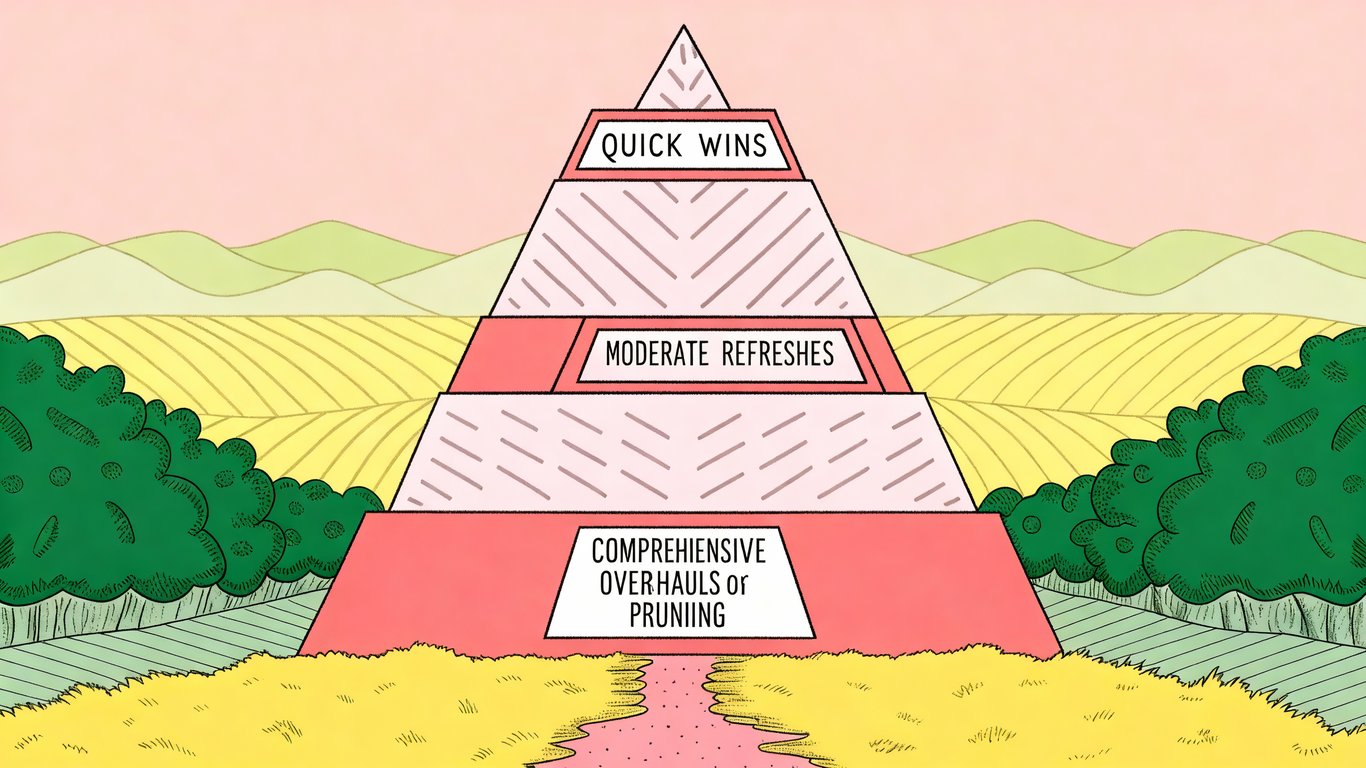
The Content Refresh Pyramid: Prioritization Framework
Think of your content in tiers. At the top: quick wins. These are pages that need minor updates but could see significant improvement. Maybe you just need to update statistics and add a few new sections.
Middle tier: moderate refreshes. These need more substantial work but have good potential. The core content is solid, but it needs expansion, better optimization, or significant updates.
Bottom tier: comprehensive overhauls. These pages need major work or might be candidates for consolidation or removal. They're important enough to keep but need serious attention.
Evaluating Content Performance Data
Focus on metrics that matter. Traffic trends show you what's declining or growing. Engagement rates tell you if people find the content valuable. Conversion rates reveal if the content drives business results.
Keyword rankings are particularly useful. A page ranking on page two for valuable keywords? That's a prime refresh candidate. Small improvements could push it to page one.
Strategic vs. Tactical Refresh Decisions
Not everything deserves a refresh. Some content should be pruned, consolidated, or redirected. If a page has never performed well, has no backlinks, and covers a topic you're no longer focused on, refreshing it probably isn't worth your time.
Strategic refreshes focus on content that supports your current business goals. Tactical refreshes address immediate issues like broken links or outdated information.
8 Proven Content Refresh Strategies and Tactics
Here's how to actually refresh content in ways that improve performance.
Updating Outdated Information and Statistics
Replace old data with current information. If you cited a 2020 study, find the 2024 version. Update dates, numbers, and references to reflect the current year.
This seems basic, but it's often the most impactful change you can make. Fresh data signals relevance to both readers and search engines.
Adding New Keywords and Search Terms
Search behavior evolves. New terms emerge. Related questions change. Research current keyword opportunities for your topic and incorporate them naturally into your content.
Don't force keywords where they don't fit. But if people are now searching for something slightly different than they were two years ago, your content should reflect that.
Refreshing and Updating Links
Broken links hurt user experience and SEO. Check every link in your content. Replace broken ones, update outdated resources, and add links to newer relevant content (both internal and external).
Internal linking is particularly valuable. Link to newer content you've published on related topics. This helps search engines understand your site structure and keeps readers engaged.
Expanding Content Depth and Coverage
Maybe your original post was 800 words. Competitors are now publishing 2,000-word comprehensive guides on the same topic. You need to match or exceed that depth.
Add new sections addressing questions you didn't cover initially. Include more examples, case studies, or practical tips. Make your content the most thorough resource available on the topic.
Improving Content Structure and Readability
Better formatting makes content easier to consume. Add subheadings to break up long sections. Use bullet points for lists. Include a table of contents for longer posts.
Short paragraphs work better online than long blocks of text. Make your content scannable so readers can quickly find what they need.
Updating Visual Elements and Media
Old screenshots immediately date your content. Update them to show current interfaces. Replace outdated graphics with fresh designs. Consider adding new visual elements like charts, infographics, or videos.
Visuals aren't just decoration. They help explain concepts, break up text, and keep readers engaged.
Optimizing for Current SEO Best Practices
SEO best practices change. Update your meta descriptions, title tags, and header structure to match current recommendations. Improve your URL structure if needed (though be careful with this; changing URLs requires proper redirects).
Check your page speed, mobile optimization, and technical SEO elements. These factors matter more now than they did a few years ago.
Strategically Pruning Underperforming Content
Sometimes the best refresh is removal. If content has never performed, has no backlinks, and doesn't support your current strategy, consider removing it or consolidating it with related content.
This improves your site's overall quality. Search engines reward sites with consistently valuable content, not sites with massive amounts of mediocre pages.
The Content Refresh Process: Step-by-Step Guide
Here's a practical workflow for refreshing content from start to finish.
Step 1: Audit and Identify Refresh Candidates
Review your content inventory. Look at performance data, publication dates, and topic relevance. Create a prioritized list of pages to refresh based on potential impact and effort required.
Step 2: Research Current Information and Trends
Before you start updating, research the current state of your topic. What are competitors covering? What new information is available? What questions are people asking now?
Gather updated statistics, new examples, and current best practices. This research phase ensures your refresh is comprehensive.
Step 3: Plan Your Updates
Don't just start editing randomly. Create a plan outlining specific changes: which sections need updating, what new content to add, which elements to remove, and how to improve structure.
Step 4: Execute the Refresh
Make your updates systematically. Work through your plan section by section. Maintain your brand voice and writing style while improving the content.
Quality matters more than speed. Take the time to do it right.
Step 5: Update Publication Dates and Metadata
Update your publication date to signal freshness. Revise your meta description to reflect new content. Make sure your title tag is optimized for current search intent.
Step 6: Republish and Promote
Treat refreshed content like new content. Share it on social media. Include it in your email newsletter. Link to it from other relevant content on your site.
Many people skip this step, but promotion amplifies the impact of your refresh efforts.
Step 7: Monitor Performance Post-Refresh
Track how your refreshed content performs. Watch for changes in rankings, traffic, and engagement. This data helps you understand what's working and refine your refresh strategy for future updates.
Best Practices for Sustainable Content Refresh
Making content refresh a regular practice requires some planning and systems.
Building Content for Easy Future Updates
When creating new content, think about future updates. Use modular design where possible. Separate evergreen information from time-sensitive details. Use dynamic elements for things that change frequently, like calls-to-action or pricing information.
This proactive approach makes future refreshes faster and easier.
Creating a Content Refresh Schedule
Different content types need different refresh frequencies. Evergreen content might only need annual updates. Time-sensitive content might need quarterly reviews. High-performing content deserves more frequent attention.
Create a schedule that works for your team and resources. Consistency matters more than frequency.
Documenting Your Refresh Process
Build templates and checklists for your refresh process. Document what works and what doesn't. This makes the process more efficient and ensures consistency across your team.
Common Content Refresh Mistakes to Avoid
Don't change URLs unless absolutely necessary. Changing URLs means setting up redirects and potentially losing link equity. Keep the same URL and just update the content.
Don't remove valuable content just because it's old. If it's still accurate and useful, keep it. Age isn't automatically a problem.
Don't make superficial updates that don't add real value. Changing a few words or updating the date without improving the content won't help. Make meaningful improvements or don't bother.
Making Content Refresh Part of Your Strategy
Content refresh isn't a one-time project. It's an ongoing practice that keeps your content valuable, relevant, and performing well.
Key Takeaways About Content Refresh
Content refresh means updating existing content rather than always creating new pieces. It's more efficient than starting from scratch and builds on authority you've already established. Regular refreshes prevent performance decline and maximize the ROI of your content investments. This practice is a core part of any content optimization strategy.
The practice works because it addresses a simple truth: content degrades over time. Information becomes outdated. Search intent evolves. Competitors publish better resources. Refreshing keeps you competitive without the full cost of new content creation.
Getting Started with Your First Content Refresh
Start small. Pick one high-performing piece that's showing signs of age. Update the statistics, fix broken links, add a new section or two. Republish it and watch what happens.
You don't need to refresh your entire site at once. One piece at a time builds momentum and helps you refine your process.
The Long-Term Value of Regular Content Maintenance
Think of content refresh as maintenance, not a special project. Regular updates keep your content library healthy and performing. Over time, this consistent attention compounds into significant traffic and conversion improvements. AI-powered autoblogging tools can help identify refresh opportunities and streamline the update process at scale.
Your content is an asset. Like any asset, it needs maintenance to retain its value. Content refresh is how you protect and grow that investment over time.